helm 搭建harbor
一、helm语法 helm repo add harbor https://helm.goharbor.io #添加源 helm search hub #查看可用源 helm show chart stable/redis #打印出指定的Charts的详细信息 helm fetch <>下载 helm search repo harbor -l 查看可下载的harbor版本 二、添加helm源,拉取harbor #helm repo add harbor https://helm.goharbor.io #helm fetch harbor/harbor –untar #拉取 https://artifacthub.io/ #helm chart展示页面 三、创建持久化存储storageclass harbor.sto.yaml kind: StorageClass apiVersion: storage.k8s.io/v1 metadata: name: harbor-data namespace: cicd provisioner: kubernetes.io/aws-ebs parameters: fsType: ext4 type: gp2 encrypted: “true” reclaimPolicy: Retain allowVolumeExpansion: true
volumeBindingMode: WaitForFirstConsumer 修改values.yaml [root@das1harbor001-new harbor]# cat harbor.yaml expose: type: nodePort tls: enabled: flase
The source of the tls certificate. Set it as “auto”, “secret”
or “none” and fill the information in the corresponding section
1) auto: generate the tls certificate automatically
2) secret: read the tls certificate from the specified secret.
The tls certificate can be generated manually or by cert manager
3) none: configure no tls certificate for the ingress. If the default
tls certificate is configured in the ingress controller, choose this option
certSource: auto auto:
# The common name used to generate the certificate, it’s necessary
# when the type isn’t “ingress”
commonName: “harbor.nginx”
secret:
secretName: “spp-reg-key”
The name of secret which contains keys named:
“tls.crt” - the certificate
“tls.key” - the private key
controller: default
Allow .Capabilities.KubeVersion.Version to be overridden while creating ingress
kubeVersionOverride: ""
nodePort:
The name of NodePort service
name: harbor ports: http: port: 80 nodePort: 30616 https: port: 443 nodePort: 30617
notary:
The service port Notary listens on
port: 4443
The node port Notary listens on
nodePort: 30618 #如果有内外网的问题这里可以配置外网地址也可以登录 #externalURL: https://10.4.84.91:30616 persistence: enabled: true
Setting it to “keep” to avoid removing PVCs during a helm delete
operation. Leaving it empty will delete PVCs after the chart deleted
(this does not apply for PVCs that are created for internal database
and redis components, i.e. they are never deleted automatically)
resourcePolicy: " " persistentVolumeClaim: registry:
Use the existing PVC which must be created manually before bound,
and specify the “subPath” if the PVC is shared with other components
existingClaim: ""
Specify the “storageClass” used to provision the volume. Or the default
StorageClass will be used(the default).
Set it to “-” to disable dynamic provisioning
storageClass: “harbor-data” subPath: "" accessMode: ReadWriteOnce size: 2Gi chartmuseum:
existingClaim: ""
storageClass: “harbor-data” subPath: "" accessMode: ReadWriteOnce size: 2Gi jobservice:
existingClaim: ""
storageClass: “harbor-data” subPath: "" accessMode: ReadWriteOnce size: 1Gi
If external database is used, the following settings for database will
be ignored
database:
existingClaim: ""
storageClass: “harbor-data” subPath: "" accessMode: ReadWriteOnce size: 1Gi
If external Redis is used, the following settings for Redis will
be ignored
redis:
existingClaim: ""
storageClass: “harbor-data” subPath: "" accessMode: ReadWriteOnce size: 1Gi trivy:
existingClaim: ""
storageClass: “harbor-data” subPath: "" accessMode: ReadWriteOnce size: 5Gi
Define which storage backend is used for registry and chartmuseum to store
images and charts. Refer to
https://github.com/docker/distribution/blob/master/docs/configuration.md#storage
for the detail.
imageChartStorage:
Specify whether to disable redirect for images and chart storage, for
backends which not supported it (such as using minio for s3 storage type),
please disable
it. To disable redirects, simply set disableredirect to true instead.
Refer to
https://github.com/docker/distribution/blob/master/docs/configuration.md#redirect
for the detail.
disableredirect: false
Specify the “caBundleSecretName” if the storage service uses a self-signed
certificate.
The secret must contain keys named “ca.crt” which will be injected into the trust
store
of registry’s and chartmuseum’s containers.
caBundleSecretName:
Specify the type of storage: “filesystem”, “azure”, “gcs”, “s3”, “swift”,
“oss” and fill the information needed in the corresponding section. The type
must be “filesystem” if you want to use persistent volumes for registry
and chartmuseum
type: filesystem filesystem: rootdirectory: /storage #maxthreads: 100 imagePullPolicy: IfNotPresent
Use this set to assign a list of default pullSecrets
#imagePullSecrets:
- name: docker-registry-secret
- name: internal-registry-secret
The update strategy for deployments with persistent volumes(jobservice, registry
and chartmuseum): “RollingUpdate” or “Recreate”
Set it as “Recreate” when “RWM” for volumes isn’t supported
updateStrategy: type: RollingUpdate
debug, info, warning, error or fatal
logLevel: info
The initial password of Harbor admin. Change it from portal after launching Harbor
harborAdminPassword: “Harbor12345”
The name of the secret which contains key named “ca.crt”. Setting this enables the
download link on portal to download the certificate of CA when the certificate isn’t
generated automatically
#caSecretName: ""
The secret key used for encryption. Must be a string of 16 chars.
#secretKey: “not-a-secure-key”
The proxy settings for updating trivy vulnerabilities from the Internet and replicating
artifacts from/to the registries that cannot be reached directly
#proxy:
httpProxy:
httpsProxy:
noProxy: 127.0.0.1,localhost,.local,.internal
components:
- core
- jobservice
- trivy
The custom ca bundle secret, the secret must contain key named “ca.crt”
which will be injected into the trust store for chartmuseum, core, jobservice,
registry, trivy components
caBundleSecretName: ""
UAA Authentication Options
If you’re using UAA for authentication behind a self-signed
certificate you will need to provide the CA Cert.
Set uaaSecretName below to provide a pre-created secret that
contains a base64 encoded CA Certificate named ca.crt.
uaaSecretName:
If expose the service via “ingress”, the Nginx will not be used
nginx: image: repository: goharbor/nginx-photon tag: v2.4.1
set the service account to be used, default if left empty
serviceAccountName: ""
# mount the service account token
automountServiceAccountToken: false
replicas: 1
resources:
requests:
memory: 256Mi
cpu: 100m
nodeSelector: {} tolerations: [] affinity: {}
Additional deployment annotations
podAnnotations: {}
The priority class to run the pod as
priorityClassName: portal: image: repository: goharbor/harbor-portal tag: v2.4.1
set the service account to be used, default if left empty
serviceAccountName: ""
# mount the service account token
automountServiceAccountToken: false
replicas: 1
resources:
requests:
memory: 256Mi
cpu: 100m
nodeSelector: {} tolerations: [] affinity: {}
Additional deployment annotations
podAnnotations: {}
The priority class to run the pod as
priorityClassName: core: image: repository: goharbor/harbor-core tag: v2.4.1
set the service account to be used, default if left empty
serviceAccountName: ""
# mount the service account token
automountServiceAccountToken: false
replicas: 1
Startup probe values
startupProbe: enabled: true initialDelaySeconds: 10
resources:
requests:
memory: 256Mi
cpu: 100m
nodeSelector: {} tolerations: [] affinity: {}
Additional deployment annotations
podAnnotations: {}
Secret is used when core server communicates with other components.
jobservice: image:
repository: goharbor/harbor-jobservice tag: v2.4.1 replicas: 1
set the service account to be used, default if left empty
serviceAccountName: ""
# mount the service account token
automountServiceAccountToken: false
maxJobWorkers: 10
The logger for jobs: “file”, “database” or “stdout”
jobLoggers:
- file
- database
- stdout
resources:
requests:
memory: 256Mi
cpu: 100m
nodeSelector: {} tolerations: [] affinity: {}
Additional deployment annotations
podAnnotations: {}
Secret is used when job service communicates with other components.
If a secret key is not specified, Helm will generate one.
Must be a string of 16 chars.
secret: ""
## The priority class to run the pod as
priorityClassName:
registry:
set the service account to be used, default if left empty
serviceAccountName: ""
# mount the service account token
automountServiceAccountToken: false
registry: image: repository: goharbor/registry-photon tag: v2.4.1
resources:
requests:
memory: 256Mi
cpu: 100m
controller: image: repository: goharbor/harbor-registryctl tag: v2.4.1
resources:
requests:
memory: 256Mi
cpu: 100m
replicas: 1 nodeSelector: {} tolerations: [] affinity: {}
Additional deployment annotations
podAnnotations: {} chartmuseum: enabled: true
set the service account to be used, default if left empty
serviceAccountName: ""
# mount the service account token
automountServiceAccountToken: false
Harbor defaults ChartMuseum to returning relative urls, if you want using absolute
url you should enable it by change the following value to ’true' absoluteUrl: false image: repository: goharbor/chartmuseum-photon tag: v2.4.1 replicas: 1
resources:
requests:
memory: 256Mi
cpu: 100m
nodeSelector: {} tolerations: [] affinity: {}
Additional deployment annotations
podAnnotations: {}
The priority class to run the pod as
priorityClassName:
limit the number of parallel indexers
indexLimit: 0 trivy:
enabled the flag to enable Trivy scanner
enabled: true image:
repository the repository for Trivy adapter image
repository: goharbor/trivy-adapter-photon
tag the tag for Trivy adapter image
tag: v2.4.1
set the service account to be used, default if left empty
serviceAccountName: ""
# mount the service account token
automountServiceAccountToken: false
replicas the number of Pod replicas
replicas: 1
debugMode the flag to enable Trivy debug mode with more verbose scanning log
debugMode: false
vulnType a comma-separated list of vulnerability types. Possible values are os and
library.
vulnType: “os,library”
severity a comma-separated list of severities to be checked
severity: “UNKNOWN,LOW,MEDIUM,HIGH,CRITICAL”
ignoreUnfixed the flag to display only fixed vulnerabilities
ignoreUnfixed: false
insecure the flag to skip verifying registry certificate
insecure: false skipUpdate: false
The duration to wait for scan completion
timeout: 5m0s
resources:
requests:
cpu: 200m
memory: 512Mi
limits:
cpu: 1
memory: 1Gi
nodeSelector: {} tolerations: [] affinity: {}
Additional deployment annotations
podAnnotations: {}
The priority class to run the pod as
priorityClassName: notary: enabled: true server:
set the service account to be used, default if left empty
serviceAccountName: ""
# mount the service account token
automountServiceAccountToken: false
image: repository: goharbor/notary-server-photon tag: v2.4.1 replicas: 1
resources:
requests:
memory: 256Mi
cpu: 100m
nodeSelector: {} tolerations: [] affinity: {}
Additional deployment annotations
podAnnotations: {}
The priority class to run the pod as
priorityClassName: signer:
set the service account to be used, default if left empty
serviceAccountName: ""
# mount the service account token
automountServiceAccountToken: false
image: repository: goharbor/notary-signer-photon tag: v2.4.1 replicas: 1
resources:
requests:
memory: 256Mi
cpu: 100m
nodeSelector: {} tolerations: [] affinity: {}
Additional deployment annotations
podAnnotations: {}
The priority class to run the pod as
database:
if external database is used, set “type” to “external”
and fill the connection informations in “external” section
type: internal internal:
set the service account to be used, default if left empty
serviceAccountName: ""
# mount the service account token
automountServiceAccountToken: false
image: repository: goharbor/harbor-db tag: v2.4.1
The initial superuser password for internal database
password: “changeit” nodeSelector: {} tolerations: [] affinity: {}
The priority class to run the pod as
priorityClassName:
initContainer:
migrator:
# resources:
# requests:
# memory: 128Mi
# cpu: 100m
permissions:
# resources:
# requests:
# memory: 128Mi
# cpu: 100m
maxIdleConns: 100
# The maximum number of open connections to the database per pod (core+exporter).
# If it <= 0, then there is no limit on the number of open connections.
# Note: the default number of connections is 1024 for postgre of harbor.
maxOpenConns: 900
## Additional deployment annotations
podAnnotations:
redis:
if external Redis is used, set “type” to “external”
and fill the connection informations in “external” section
type: internal internal:
set the service account to be used, default if left empty
serviceAccountName: ""
mount the service account token
automountServiceAccountToken: false image: repository: goharbor/redis-photon tag: v2.4.1
resources:
requests:
memory: 256Mi
cpu: 100m
nodeSelector: {} tolerations: [] affinity: {}
The priority class to run the pod as
priorityClassName: podAnnotations: {}
helm install harbor harbor/harbor -f harbor.yaml –namespace #安装
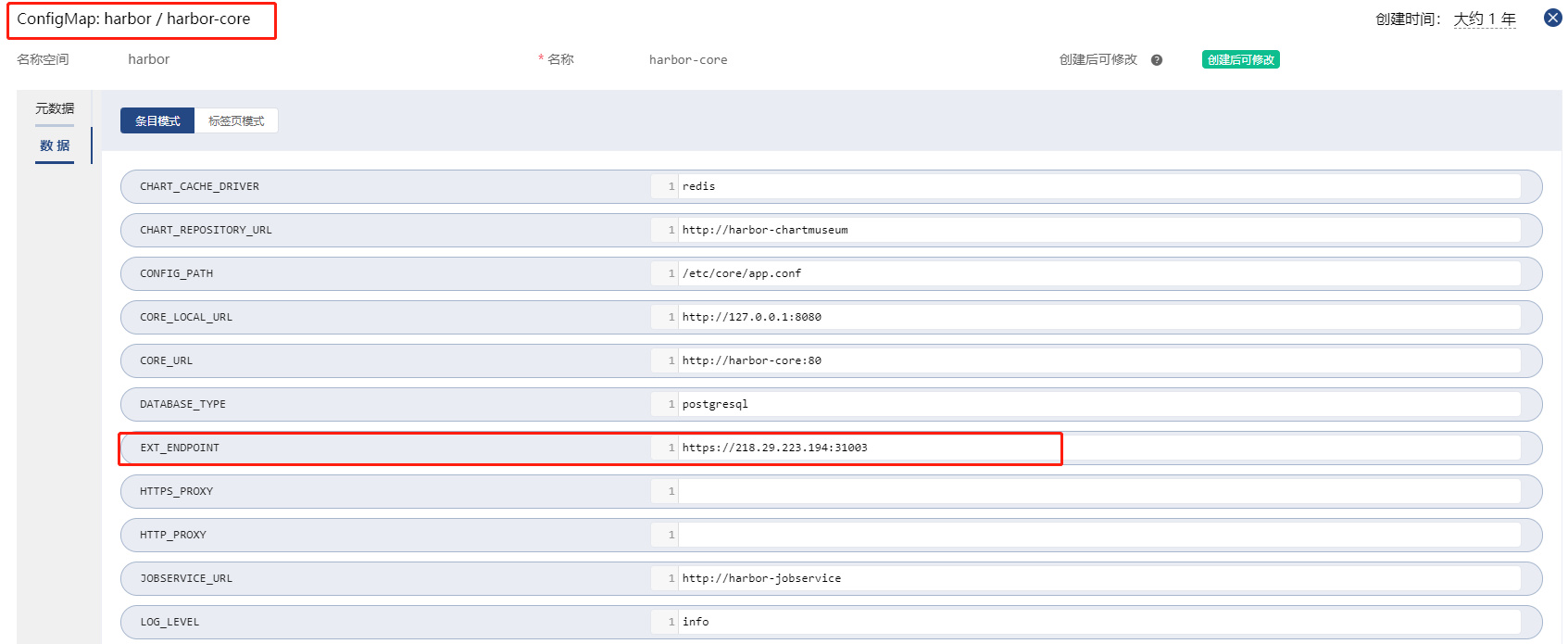
外网地址配置