centos stream8 rpm 安装mysql8
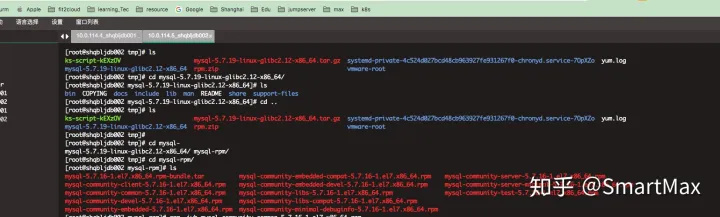
1.下载mysql rpm 安装包。选择对应的操作系统版本官网地址:如下 2.上传tar 包到linux 服务器并解压 3.解压结果如上图,会产生多个rpm包,我们不会用到这么多,只会用到其中的四个,依次执行下面命令(具体到版本号 有差别,请注意) rpm -ivh mysql-community-common-5.7.22-1.el7.x86_64.rpm rpm -ivh mysql-community-libs-5.7.22-1.el7.x86_64.rpm rpm -ivh mysql-community-client-5.7.22-1.el7.x86_64.rpm rpm -ivh mysql-community-server-5.7.22-1.el7.x86_64.rpm 4、安装过程中出现
error: Failed dependencies: libcrypto.so.10()(64bit) is needed by mysql-community-libs-8.0.27-1.el7.x86_64 libcrypto.so.10(libcrypto.so.10)(64bit) is needed by mysql-community-libs-8.0.27- 1.el7.x86_64 libssl.so.10()(64bit) is needed by mysql-community-libs-8.0.27-1.el7.x86_64 libssl.so.10(libssl.so.10)(64bit) is needed by mysql-community-libs-8.0.27-1.el7.x86_64 mysql-community-client-plugins = 8.0.27-1.el7 is needed by mysql-community-libs-8.0.27- 1.el7.x86_64 需要安装compat-openssl10-1.0.2o-3.el8.x86_64.rpm 下载 wget https://vault.centos.org/centos/8/AppStream/x86_64/os/Packages/compat-openssl10-1.0.2o-3.el8.x86_64.rpm 安装 rpm -ivh compat-openssl10-1.0.2o-3.el8.x86_64.rpm 安装 rpm -ivh mysql-community-client-8.0.27-1.el7.x86_64.rpm warning: mysql-community-client-8.0.27-1.el7.x86_64.rpm: Header V3 DSA/SHA256 Signature, key ID 5072e1f5: NOKEY error: Failed dependencies: libncurses.so.5()(64bit) is needed by mysql-community-client-8.0.27-1.el7.x86_64 libtinfo.so.5()(64bit) is needed by mysql-community-client-8.0.27-1.el7.x86_64 解决 [root@localhost mysql]# sudo yum install libncurses* [root@localhost mysql8]# systemctl status mysqld ● mysqld.service - MySQL Server Loaded: loaded (/usr/lib/systemd/system/mysqld.service; enabled; vendor preset: disabled) Active: failed (Result: exit-code) since Wed 2023-04-12 13:32:56 CST; 3min 24s ago Docs: man:mysqld(8) http://dev.mysql.com/doc/refman/en/using-systemd.html Process: 3930 ExecStart=/usr/sbin/mysqld $MYSQLD_OPTS (code=exited, status=1/FAILURE) Process: 3851 ExecStartPre=/usr/bin/mysqld_pre_systemd (code=exited, status=0/SUCCESS) Main PID: 3930 (code=exited, status=1/FAILURE) Status: “Server startup in progress” Error: 13 (Permission denied)
Apr 12 13:32:56 localhost.localdomain mysqld[3930]: 2023-04-12T05:32:56.356667Z 0 [Warning] [MY-010091] [Server] Can’t create test file /data/mysql8/mysqld_tmp_file_case_insensitive_test.lower-test Apr 12 13:32:56 localhost.localdomain mysqld[3930]: 2023-04-12T05:32:56.356805Z 0 [System] [MY-010116] [Server] /usr/sbin/mysqld (mysqld 8.0.27) starting as process 3930 Apr 12 13:32:56 localhost.localdomain mysqld[3930]: 2023-04-12T05:32:56.360118Z 0 [Warning] [MY-010091] [Server] Can’t create test file /data/mysql8/mysqld_tmp_file_case_insensitive_test.lower-test Apr 12 13:32:56 localhost.localdomain mysqld[3930]: 2023-04-12T05:32:56.360146Z 0 [Warning] [MY-010091] [Server] Can’t create test file /data/mysql8/mysqld_tmp_file_case_insensitive_test.lower-test Apr 12 13:32:56 localhost.localdomain mysqld[3930]: 2023-04-12T05:32:56.360787Z 0 [ERROR] [MY-010187] [Server] Could not open file ‘/data/mysql8/mysqld.log’ for error logging: Permission denied Apr 12 13:32:56 localhost.localdomain mysqld[3930]: 2023-04-12T05:32:56.360948Z 0 [ERROR] [MY-010119] [Server] Aborting Apr 12 13:32:56 localhost.localdomain mysqld[3930]: 2023-04-12T05:32:56.361174Z 0 [System] [MY-010910] [Server] /usr/sbin/mysqld: Shutdown complete (mysqld 8.0.27) MySQL Community Server - GPL. Apr 12 13:32:56 localhost.localdomain systemd[1]: mysqld.service: Main process exited, code=exited, status=1/FAILURE Apr 12 13:32:56 localhost.localdomain systemd[1]: mysqld.service: Failed with result ’exit-code’. Apr 12 13:32:56 localhost.localdomain systemd[1]: Failed to start MySQL Server. 临时解决方法: setenforce 0 如果还有问题删掉data下的所有文件,重新执行以上操作 修改临时密码 cat /var/log/mysqld.log | grep password 提示必须要修改初始密码,才能执行命令,可以用如下命令进行修改: mysql> alter user ‘root’@’localhost’ identified by ‘Gilight123!@#’; Query OK, 0 rows affected (0.01 sec) ALTER USER ‘root’@’localhost’ IDENTIFIED BY ‘123456’; use mysql; select Host,User from user; update user set Host=’%’ where User = ‘root’; 1
修改的密码强度规则 新密码必须满足密码强度规则,默认规则如下: mysql> show variables like ‘validate_password%’; +————————————–+——–+ | Variable_name | Value | +————————————–+——–+ | validate_password.check_user_name | ON | | validate_password.dictionary_file | | | validate_password.length | 8 | | validate_password.mixed_case_count | 1 | | validate_password.number_count | 1 | | validate_password.policy | MEDIUM | | validate_password.special_char_count | 1 | +————————————–+——–+ 简单解释一下,新密码至少为8位(length),其中大小写字母至少各一个(mixed_case_count),数字至少一个 (number_count),特殊字符至少一个(special_char_count)。如果不满足以上任一条件,则提示如下错误: mysql> alter user ‘root’@’localhost’ identified by ’test@123’; ERROR 1819 (HY000): Your password does not satisfy the current policy requirements 至此,RPM包安装MySQL完毕。
