gitlab-runner安装
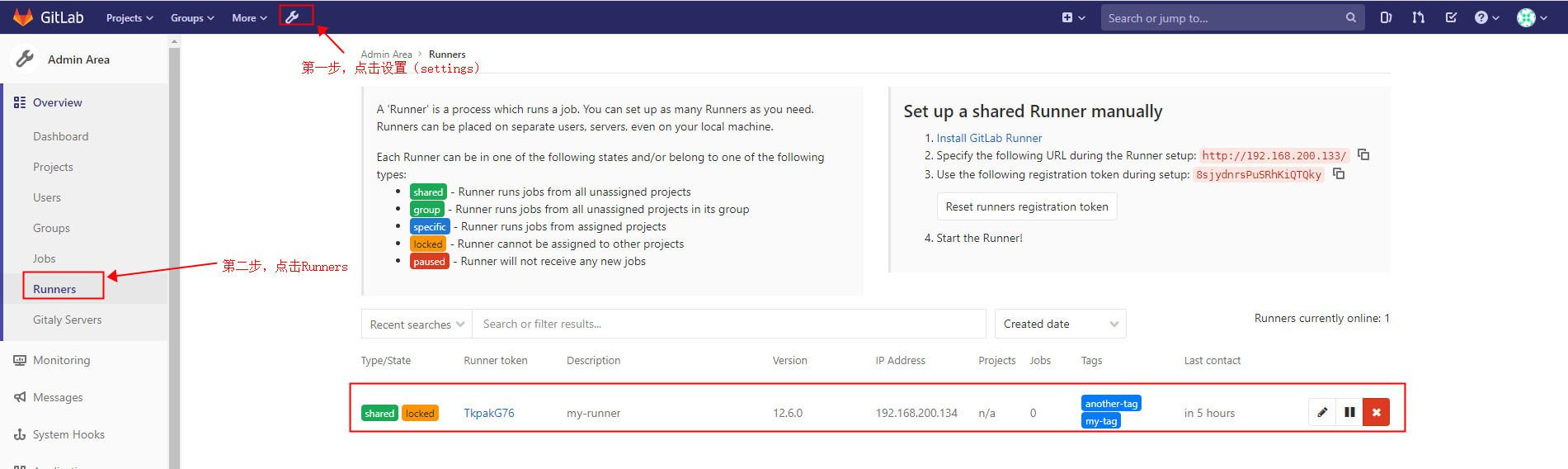
1、在清华源网站下载安装包 Index of /gitlab-runner/yum/el8-x86_64/ | 清华大学开源软件镜像站 | Tsinghua Open Source Mirror 2、执行安装命令 #rpm离线安装gitlab runner,需要依赖git,所以请提前安装git rpm -ivh 3、启动runner systemctl daemon-reload #重新加载配置 systemctl start gitlab-runner #启动服务 systemctl enable gitlab-runner #设置开机启动 systemctl restart gitlab-runner #重启服务 4、注册runner runner 分为三种: Shared Runners: Group Runners: Specific Runners: 不同类型的runner是通过取自不同位置的token来指定的,管理员用户从软件设置处取得的为shared runner,从group的ci/cd取得的token则为group类型,一次类推。下面示例是shared runner。 一台机器可以注册多个runner gitlab-runner register root@k8s-node02 ~]# gitlab-runner register Runtime platform arch=amd64 os=linux pid=6245 revision=ac8e767a version=12.6.0 Running in system-mode. #输入公司的gitlab公网地址 Please enter the gitlab-ci coordinator URL (e.g. https://gitlab.com/) : http://192.168.200.133/
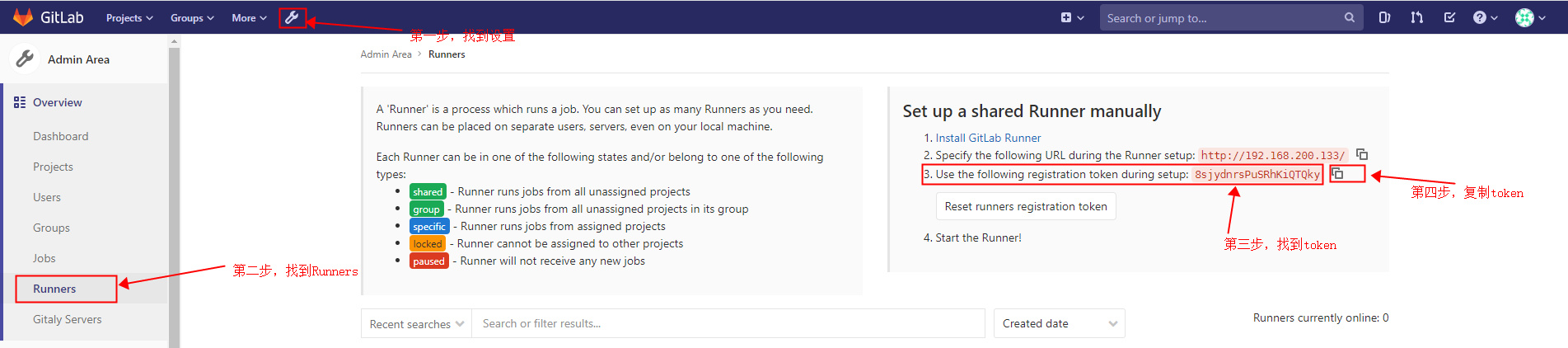
#输入gitlab的token,找到第三步token,然后选择第四步,复制token Please enter the gitlab-ci token for this runner: 8sjydnrsPuSRhKiQTQky #输入runner的描述 Please enter the gitlab-ci description for this runner: [k8s-node02]: my-runner #输入runner的别名, 在gitlab-ci.yml通过这个选择运行的runner Please enter the gitlab-ci tags for this runner (comma separated): my-tag,another-tag Registering runner… succeeded runner=8sjydnrs sh #输入runner执行器的环境 Please enter the executor: custom, docker-ssh, parallels, kubernetes, docker-ssh+machine, docker, shell, ssh, virtualbox, docker+machine: shell Runner registered successfully. Feel free to start it, but if it’s running already the config should be automatically reloaded! 5、验证gitlab runner是否注册成功 6、gitlab Runner常用命令汇总
命令描述 gitlab-runner run gitlab-runner register gitlab-runner start gitlab-runner stop gitlab-runner restart gitlab-runner status gitlab-runner unregister gitlab-runner list 检查已注册的运行程序是否可以连接到GitLab,但 它不验证GitLab Runner服务是否正在使用运行程 序。 gitlab-runner verify –delete